When working with Unified Developer Experience (UDE) environments in Microsoft Dynamics 365 Finance & Operations, database synchronization errors can sometimes occur during package deployment. These issues can be particularly frustrating because the deployment may fail even though the custom package itself does not appear to contain any obvious problems.
I recently encountered this situation while deploying custom models to a UDE environment.
This is the Error Message:Error Message: "Microsoft.Dynamics.CAP.Iris.Connectors.Exceptions.DSSidecarOperationException: DS/Sidecar operation: dbsync failed with the error code FailedDependency; error message: Failure happened while running DBSync on environment MyDevEnv..\r\n\tstatusCode = FailedDependency\r\n\r\n at Microsoft.Dynamics.CAP.Iris.Jobs.LifecycleJobs.DBSyncJob.RunPollAsync(DBSyncMetadata dbsyncMetadata) in C:\__w\1\s\src\Iris.Infrastructure\Jobs\Lifecycle\JobCallbacks\CommonActions\DBSyncJob.cs:line 108\r\n at Microsoft.Dynamics.CAP.Iris.Jobs.Platform.LongRunningWithPollingJob1.RunAsync() in C:\\__w\\1\\s\\src\\Iris.Infrastructure\\Jobs\\Platform\\LongRunningWithPollingJob.cs:line 60\r\n at Microsoft.Dynamics.CAP.Iris.Jobs.Platform.WhatIfModeSupportedJob1.ExecuteAsync() in C:\__w\1\s\src\Iris.Infrastructure\Jobs\Platform\WhatIfModeSupportedJob.cs:line 68"
How to fix:
The workaround that solved the problem for me is the following:
Prerequisite:
Run the build and make sure there are no errors.
Step 1:
Do a full sync of the database:
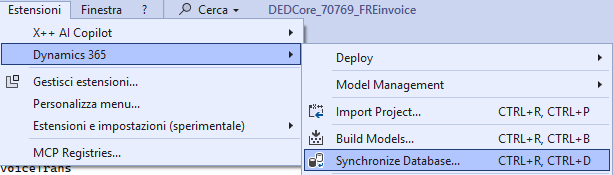
Step 2:
when sync is finished, check if it’s ok

Step 3:
after sync, deploy code of the models you are updating
Step 4:
do a full sync same as in step 1